
IM integration
IM 集成将智能体接入企业微信、飞书、钉钉、Slack、Telegram 等聊天平台。用户可在平台中向机器人提问,由 GsKnora 根据绑定的智能体配置执行检索和回答。
在「设置 → IM 集成」新建渠道,选择平台、填写应用凭据并绑定智能体后启用。Webhook 模式需要在平台后台填写回调地址;长连接模式无需为接收消息配置公网回调地址。每个渠道可单独设置「回复语言」,固定智能体在该渠道的回复语言;留空时使用部署默认语言。
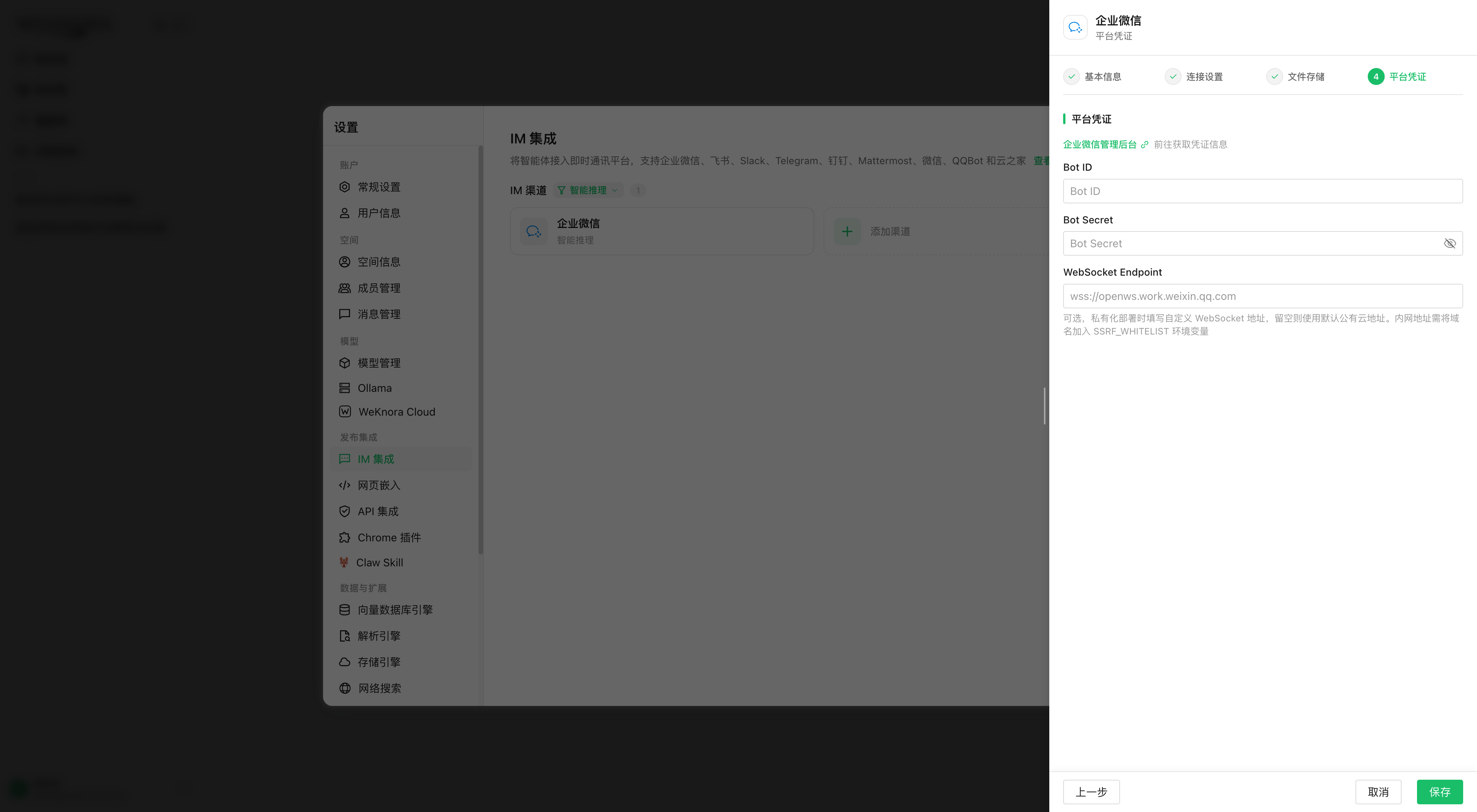
支持的平台还可将收到的文件导入知识库,并提供 /help 等内置命令。具体行为取决于平台能力和渠道配置。
支持的平台与能力对比
internal/handler/im.go 中 validIMPlatforms 定义了 11 个合法平台。各平台能力(以各 factory.go 与 adapter 编译期断言为准):
| 平台 | 接入模式(默认加粗) | 流式回复 StreamSender | 文件下载 FileDownloader | 线程/话题 ThreadID | 主要凭据字段(credentials JSON) |
|---|---|---|---|---|---|
企业微信 wecom | websocket(智能机器人长连接)/ webhook(自建应用回调) | 仅 websocket 模式 | 两种模式均支持 | 否 | websocket:bot_id、bot_secret、ws_endpoint、bot_name;webhook:corp_id、agent_secret、token、encoding_aes_key、corp_agent_id、api_base_url |
飞书 feishu | websocket(长连接事件流)/ webhook | 是(流式卡片) | 是 | 是(root_id,顶层消息用自身 message_id) | app_id、app_secret、verification_token、encrypt_key |
Lark lark | 同飞书(同一适配器,RegionLark 指向 open.larksuite.com) | 是 | 是 | 是 | 同飞书 |
Slack slack | websocket(Socket Mode)/ webhook(Events API) | 是 | 是 | 是(thread_ts) | websocket:app_token + bot_token;webhook:bot_token + signing_secret |
Telegram telegram | websocket(长轮询 getUpdates)/ webhook | 是(消息编辑) | 是 | 是(Forum Topics 的 message_thread_id) | bot_token;webhook 另有 secret_token |
WhatsApp whatsapp (Meta Cloud API) | webhook only (forced; output_mode=full) | No (a sent message cannot be edited: read receipt + typing indicator, then the full answer split at 4096 characters) | Yes (images, documents) | No | phone_number_id, access_token, app_secret, verify_token, api_version (optional, default v24.0) |
钉钉 dingtalk | websocket(Stream 模式,v0.8.2 起仅支持此模式;升级迁移 000096 会把 webhook 渠道改为 websocket,需在钉钉开发者后台开启 Stream) | 是(AI 卡片) | 是 | 否 | client_id、client_secret、card_template_id |
Mattermost mattermost | webhook(仅支持 Outgoing Webhook + REST API) | 是 | 是 | 是(root_id) | site_url、bot_token、outgoing_token(必填)、bot_user_id、post_to_main |
微信 wechat(iLink 机器人) | longpoll(强制;创建时后端强制 mode=longpoll、output_mode=full) | 否(仅整段输出) | 是 | 否 | bot_token、ilink_bot_id(均必填) |
QQ 机器人 qqbot | websocket(仅支持) | 否 | 否 | 否 | app_id、client_secret、api_base_url、gateway_url |
云之家 yunzhijia | webhook / websocket(从 send_msg_url 推导 WS 地址) | 否 | 是 | 是(顶层 msgId / 回复 replyRootMsgId) | send_msg_url(必填)、secret、app_id、app_secret、allowed_webhook_host_suffix、timeout_seconds |
WhatsApp (WhatsApp Business Platform, Cloud API)
The whatsapp channel (internal/im/whatsapp/) lets the assistant answer people who write to the organisation's WhatsApp Business number, using the agent bound to the channel.
How it works
- Webhook verification (GET): Meta calls the callback URL with
hub.mode=subscribe,hub.verify_tokenandhub.challenge; when the token matchesverify_tokenthe answer is200with thehub.challengevalue as plain text, otherwise403. - Incoming messages (POST): every request must carry
X-Hub-Signature-256: sha256=<HMAC-SHA256 of the raw body, key = app secret>. Unsigned or wrongly signed requests get403and are not processed. Status updates (statuses), reactions and messages for another number are acknowledged without a reply. - Duplicates: Meta retries an unacknowledged webhook for 7 days; the
wamidfeeds the shared channel deduplication (Redisim:dedup:or local memory). - Reply:
POST https://graph.facebook.com/<version>/<phone_number_id>/messageswith the token asAuthorization: Bearer. The adapter first marks the message as read with the typing indicator, then sends the full answer split at 4096 characters (paragraphs, then lines, then spaces). Markdown is adapted to WhatsApp formatting (*bold*, links as "text (url)"). - Identity: the session key is the business-scoped user ID (
from_user_id, BSUID) when Meta provides it, otherwise the phone number (from). Replies go to the phone number when known (to), otherwise to the BSUID (recipient). - Attachments: images and documents go through the shared file pipeline (download by media ID; the token is only sent to
*.fbsbx.comover HTTPS). Voice notes, videos, stickers, locations… get a reply asking to write in text. - Commands:
/help,/info,/search,/stop,/clearas on the other channels.
24-hour window: the assistant only replies to received messages, within the 24-hour customer-service window opened by each message from the person. It never sends messages on its own initiative: message templates are not supported.
Privacy: messages transit through Meta. The sender is not an identified workspace user: the channel uses the usual IM identity (im_user principal, viewer role) and only the scope of the bound agent (its knowledge bases and tools). Binding a dedicated agent without access to trainees' personal data is recommended.
Meta setup
- On developers.facebook.com, create a "Business" app linked to the organisation's Meta Business account.
- Add the "WhatsApp" product.
- Try it with Meta's test number (add your own recipient numbers); for production, add and verify the organisation's number.
- In WhatsApp > API Setup, copy the Phone number ID (
phone_number_id). - Create a system user (Business settings), assign it the app and the WhatsApp account, and generate a permanent token with
whatsapp_business_messagingandwhatsapp_business_management(access_token). The temporary token expires after 24 h. - In App settings > Basic, copy the App secret (
app_secret). - Choose a verify token (
verify_token, "Generate" button in the screen). - Save the channel in GsKnora, reopen it and copy
https://<domain>/api/v1/im/callback/<channel id>; paste it as the callback URL in WhatsApp > Configuration with the same token, then "Verify and save". - Subscribe to the webhook
messagesfield.
A Meta app has a single callback URL: one GsKnora channel per app. Credentials are stored in im_channels.credentials like the other channels' and are never returned by the channel list.
内置命令系统
命令框架在 command.go / command_registry.go:命令只声明意图(CommandResult.Action),副作用由 Service 执行;LooksLikeCommand 区分"命令尝试"(/help)与应透传给 QA 的路径文本(/api/v2/users)——前者未注册时回复"未知指令",后者正常进入问答。
NewService 中注册的全部命令:
| 命令 | 实现文件 | 功能 | 副作用 |
|---|---|---|---|
/help [命令名] | cmd_help.go | 列出全部可用指令,或查看某条指令的详细用法 | 无 |
/info | cmd_info.go | 展示当前绑定 Agent 的信息与能力:Agent/RAG 模式、启用的知识库清单(KBSelectionMode all/selected/none)、Skills、MCP 服务、联网搜索开关、输出模式 | 无 |
/search <关键词> | cmd_search.go | 直接对 Agent 可达的知识库做混合检索(向量+关键词),返回原文片段(不经 AI 总结);最多显示 5 条、每条 200 rune,附匹配度百分比。知识库范围与 QA 流水线的 resolveKnowledgeBasesFromAgent 一致(含 Agent 模式能力过滤) | 无 |
/stop | cmd_stop.go | 中止当前正在进行的回答(可打断长 ReAct 推理链) | ActionStop:先移出队列或取消本机 in-flight;再向 StreamManager 写 stop 事件(与 Web 端 StopSession 同机制,支持跨实例停止——通过 im:inflight: 映射查到 sessionID/messageID);最后写 Redis im:stop: 标记兜底"已排队未执行"的请求 |
/clear | cmd_clear.go | 清空对话记忆 | ActionClear:软删当前 ChannelSession,下一条消息创建全新 GsKnora 会话 |
群聊与私聊行为
ChatType由适配器判定:direct(私聊,ChatID为空)或group。- 飞书/Lark:群聊中通常需要 @机器人(长连接订阅到的群消息文本带
@_user_N前缀,适配器循环剥除后再处理);回复时群聊优先走 reply-in-thread(话题回复),若群不支持话题(错误码 230071 等)自动回退普通发消息(adapter.go的 fallback 逻辑)。 - Slack:群聊消息来自
AppMentionEvent(@机器人)以及 channel/group 的MessageEvent(过滤BotID非空的机器人消息、非file_share的 subtype);回复固定发在 thread 中(thread_ts顶层消息用自身时间戳)。 - Telegram:
group/supergroup判定为群聊,剥除@botname提及前缀;回复带reply_to_message_id。 - Mattermost:Outgoing Webhook 触发词必须是消息第一个词,否则回调解析为空消息(
handler/im.go中有针对性的排查日志);post_to_main凭据控制回帖发主频道还是线程。 - 会话隔离:
user模式下同一用户在"私聊"与"群 A""群 B"分别是不同ChannelSession(key 含chat_id);thread模式下同一线程内所有用户共享会话。
文件消息处理
文件和图片会作为 QA 附件处理:文档内容会提供给模型,图片会在模型支持时直接识别。因此,即使渠道未配置文件知识库,机器人也会基于附件内容正常回复。
knowledge_base_id 只决定是否将附件额外保存到知识库,必须是渠道所在空间的知识库(受限 API key 还要求在其知识库白名单内),否则创建或更新渠道时返回 400。配置后,保存任务在后台执行,不影响当前 QA 回复,也不会额外发送“已入库”或“解析完成”消息。解析文本最多保留前 500 行且不超过 32 KiB,触及任一限制时模型会得到通用截断提示。附件无法读取、平台不支持下载或文件超过 32 MiB 时,机器人会提示用户改用文字描述或重新发送。
回复中的图片外链(resource:// 改写)
答案里引用知识库图片时,正文中是 resource:// 或 local:// / minio:// 等内部引用,IM 客户端无法直接拉取。rewriteStorageURLs(internal/im/service.go)在发送前把它们换成可访问的 http(s) URL:
- 各 IM 渠道共用这条转换链路。
resource://按资源记录中的所属空间和存储实例生成链接;同一回答可引用多个实例,共享知识库图片使用资源所属空间的实例,无需把全局STORAGE_TYPE改成相同类型。绑定实例缺失、停用或解析失败时保留原引用并记录 WARN,不回退到全局存储; - 跨空间图片在签名前检查实际知识库绑定、当前共享权限和智能体知识库范围;仅在答案中出现引用不会获得访问权。共享撤销后不再签发新链接;已签发链接仍按原有效期过期;
- 聊天附件和生成文件在写入时记录实际使用的全局存储实例。历史未绑定资源仅在物理路径能唯一匹配存储位置时补齐绑定,不使用空间默认存储猜测;
- 解析结果不是 http(s) 时(例如仍是内部
storage://路径),保留原引用并打一条可操作的 WARN,而不是把 IM 端注定加载失败的链接发出去; - 成功改写的 INFO 日志只记录原引用;签名 URL 仅在 DEBUG 日志中输出。
要让图片正常显示,二选一:
- 存储后端公网可达:对象存储使用公网 endpoint(或把
MINIO_ENDPOINT设为公网 host),resource://会回退到后端预签名 URL; - 配置
APP_EXTERNAL_URL:resource://改写成<APP_EXTERNAL_URL>/r/<token>,请求经 nginx 的location ^~ /r/反代回 app。官方前端镜像已内置该 location;自建反代必须补上,否则请求落进 SPA fallback 返回空白页。
默认的 MinIO 内网部署(minio:9000)和 local 后端只能走第二种。IM 渠道已启用但 APP_EXTERNAL_URL 为空时,LoadAndStartChannels 会打印一次启动告警(imImageConfigWarning)。
图片仍然不显示时,按图片与文件的对外访问的排查表逐项对照——那里汇总了四种 URL 形式与各渠道的取法。
MCP OAuth 授权通知(身份绑定)
IM 场景下没有可交互的前端来完成 MCP 服务的会话内 OAuth 授权,因此:
withIMIdentity给上下文打上MCPOAuthNonInteractive标记——Agent 遇到未授权的 OAuth MCP 服务时不阻塞等待,而是发出一次性EventMCPOAuthRequired事件;handleMessageStream收集这些事件(按 ServiceID 去重),回答结束后由buildIMMCPAuthNotice生成授权提示追加在回复末尾:若配置了APP_EXTERNAL_URL且 OAuthManager 可用,则为每个服务生成专属授权链接(回调地址<APP_EXTERNAL_URL>/api/v1/mcp-oauth/callback,主体为PrincipalIMUser,即授权与"租户+渠道+平台+IM 用户"绑定);否则提示到 GsKnora 管理后台完成授权;- 用户点链接完成授权后重新发送原消息即可使用该 MCP 服务。
配置与运行参考
渠道模型与配置(internal/im/types.go)
一个 IMChannel(表 im_channels)把某个平台机器人绑定到某个 Agent:
| 字段 | 说明 |
|---|---|
AgentID | 绑定的自定义智能体;回答走该 Agent 的配置(模型、知识库、Skills、MCP、联网搜索) |
Platform / Mode | 平台与接入模式。默认值:mattermost/yunzhijia → webhook,wechat → longpoll(且强制 output_mode=full),其余 → websocket |
OutputMode | stream(默认,流式)或 full(等完整答案后一次性回复) |
Locale | 回复语言:zh-CN / en-US / ja-JP / ko-KR / ru-RU,其他值返回 400。留空(默认)使用 WEKNORA_LANGUAGE,未设置时为 zh-CN。IM 回调请求头里的 Accept-Language 来自平台而非提问者,因此不参与决定回复语言 |
KnowledgeBaseID | 可选"文件知识库"。无论是否配置,文件/图片都会下载后供 QA 理解;配置后会额外在后台入库(见下文) |
SessionMode | user(默认,按 平台+用户+群 维度映射会话)或 thread(按 平台+线程+群 维度,每个顶层消息开新会话) |
BotIdentity | 由平台+模式+凭据推导的机器人唯一标识(computeBotIdentity,如 feishu:<app_id>、telegram:<botID>、wecom:ws:<bot_id>),数据库唯一索引防止同一个机器人被配置到两个渠道(checkDuplicateBot 返回 duplicate_bot: 前缀错误 → HTTP 409) |
Credentials | JSONB 凭据。列表接口(IMChannelSummary)从不返回凭据内容,只返回 credentials_configured 布尔值 |
ChannelSession(表 im_channel_sessions)把 (platform, user_id, chat_id, thread_id, tenant_id) 映射到 GsKnora session_id,实现 IM 侧的对话连续性。若底层 Session 被从 Web UI 删除,HandleMessage 会检测 ErrSessionNotFound,软删陈旧映射并自动重建(修复 #1046、#1499 中"机器人永久失联"的问题)。
渠道管理 API(internal/handler/im.go + routes_agent.go)
| 方法与路径 | 说明 |
|---|---|
POST /api/v1/agents/:id/im-channels | 为 Agent 创建渠道(校验 platform 合法性、填充默认 mode/output_mode) |
GET /api/v1/agents/:id/im-channels | 列出 Agent 的渠道(不含凭据) |
GET /api/v1/im-channels | 租户内跨 Agent 渠道总览 |
PUT /api/v1/im-channels/:id | 局部更新(name/mode/output_mode/locale/session_mode/knowledge_base_id/credentials/enabled/agent_id);knowledge_base_id 传空字符串即解除文件知识库 |
DELETE /api/v1/im-channels/:id | 删除 |
POST /api/v1/im-channels/:id/toggle | 启用/停用 |
POST /api/v1/wechat/qrcode、POST /api/v1/wechat/qrcode/status | 微信(iLink)扫码绑定:生成二维码并轮询状态 |
GET / POST /api/v1/im/callback/:channel_id | 平台回调地址(webhook 模式下配置到各平台后台;走平台自身签名校验,不需要 GsKnora API Key) |
Webhook 模式的接入方式就是把 https://<你的域名>/api/v1/im/callback/<channel_id> 填到平台的事件订阅/回调地址处;GsKnora 会先响应平台的 URL 验证挑战(HandleURLVerification,如飞书的 challenge 回显、企微的 echostr 解密),之后每个回调都过 VerifyCallback 签名校验。WebSocket/长连接模式则无需公网回调地址,由 GsKnora 主动连接平台网关。
飞书/Lark 反向代理
credentials.api_base_url 可覆盖 API origin,并同时用作长连接 SDK 的 bootstrap domain。留空分别使用飞书/Lark 默认云地址;私有网络可填 https://feishu-proxy.example.com,不在结尾附加具体 API 路径。代理应转发平台 API 与长连接启动请求,启动响应返回的 WebSocket 地址也必须能从 GsKnora 服务器访问。只代理网页控制台不能解决服务器到飞书的网络问题。
{"platform":"feishu","mode":"websocket","credentials":{"app_id":"<app-id>","app_secret":"<app-secret>","api_base_url":"https://feishu-proxy.example.com"}}云之家选择 session_mode=thread 后按话题复用会话,顶层消息启动新线程,回复沿根消息线程继续。钉钉富文本消息会提取可读内容;飞书 post 消息中的图片进入图片处理。output_mode=full 可显示中间过程与输出进度,answer_only 保留最终答案。
长连接的可靠性:leader 选举与 Supervisor
- 多实例 leader 选举(
service.go):websocket/longpoll 渠道在多实例部署(有 Redis)时,通过SETNX im:ws:leader:<channelID>(TTL 15s,每 5s 续期)保证只有一个实例维持长连接;非 leader 实例每 10s 重试抢锁,leader 宕机后自动接管。longpoll 渠道停止后保留锁至过期,等 TTL 自然过期,避免新旧实例短暂双写。续期失败(丢失 leader 身份)时走handleWSLeadershipLoss:先停掉本实例的适配器,再把渠道放回抢锁重试循环——重试前会重新读一次数据库中的渠道行,因此期间被删除、禁用或改配置的渠道不会被旧运行时复活。 - 连接保活(
supervisor.go的RunSupervised):部分 SDK(钉钉、飞书)的内部重连可能出现连接对象存在但无法接收消息的状态,Supervisor 每 6 小时(defaultRecycleInterval)主动重建连接,连接失败按 5s 退避重试,把最坏停摆时间限制在回收间隔内。 - 云之家长连接(
yunzhijia/websocket.go):每 15s 发送心跳,45s 内收不到任何数据即判定连接失效并重连;单条连接最长保持 6 小时后主动重建。重连按 1s、2s、5s、10s、30s、60s 退避。
多实例部署要点
所有分布式状态集中定义在 service.go 的 Redis key 前缀常量:
| Redis Key | 用途 |
|---|---|
im:ws:leader:<channelID> | WebSocket/长轮询渠道 leader 选举(TTL 15s,5s 续期,10s 抢锁重试) |
im:dedup:<messageID> | 跨实例消息去重(TTL 5min) |
im:stop:<userKey> | 跨实例 /stop 预执行标记(TTL 30s) |
im:inflight:<userKey> | userKey → sessionID:messageID 映射,供跨实例 /stop 写 StreamManager 停止事件 |
im:queue:user:<userKey> | 全局单用户排队计数 |
im:ratelimit:<key> | 滑动窗口限流(ZSET) |
im:global:active | 全局并发 QA worker 计数(Lua 原子 INCR+校验,TTL 5min 自愈) |
无 Redis(Lite/单实例模式)时全部回退为本地内存实现,功能不变,仅失去跨实例语义。
消息处理流程
IMCallback(webhook)或长连接回调最终都进入 Service.HandleMessage,随后经队列进入 QA 执行:
关键细节(均见 service.go):
- 去重:
MessageID写入 Redisim:dedup:(TTL 5 分钟)或本地sync.Map(单实例模式),IM 平台重推的回调直接跳过。 - 限流:按
channelID:userID:chatID[:threadID]做滑动窗口限流(默认 60s 内 10 条,可经config.IM覆盖);斜杠命令绕过限流,保证用户在风暴中仍能/stop。 - QA 队列(
qaqueue.go):有界队列 + 固定 worker 池(默认 workers=5、队列上限 50、单用户排队上限 3、排队超时 60s),多实例下通过 Redis 计数实现全局单用户上限(im:queue:user:)与可选的全局并发闸门(im:global:active+ Lua 脚本,GlobalMaxWorkers配置),对下游 LLM 形成背压。排队位置 > 0 时先回一条"排队中"提示。 - 会话解析:
user模式按用户维度共享会话,标题形如"张三 · 群聊 1a2b3c4d";thread模式每个顶层消息/话题一个会话(Slack thread、飞书话题群、Telegram Forum Topic、Mattermost root_id)。首条消息会异步生成会话标题(GenerateTitleAsync)。 - 身份注入(
withIMIdentity):IM 回调走平台签名而非 GsKnora 登录态,因此注入合成身份system-<tenantID>+PrincipalIMUser(tenantID:channelID:platform:userID)+ Viewer 角色,使组织共享知识库等依赖 UserID 的逻辑正常工作;同时标记MCPOAuthNonInteractive(见MCP OAuth 授权通知)。 - 流式渲染(
handleMessageStream+think.go+tool_display.go):订阅 EventBus 的EventAgentThought(思考)、EventAgentToolCall/EventAgentToolResult(工具状态行,内部工具经isToolVisibleToUser过滤;快速问答只显示query_understand/knowledge_search两个 RAG 流水线工具)、EventAgentFinalAnswer(答案分片)、EventAgentReferences(引用)、EventAgentComplete。Agent 模式下"乐观答案"在后续又发起工具调用时会被撤回进思考块(retractAgentLiveAnswer,与 Web 端 superseded preamble 一致)。每 300ms 把缓冲内容整段推送(UpdateStreamContent为替换语义);holdbackCutoff会扣住跨分片边界的不完整provider://URL、Markdown 图片、XML 标签,避免闪烁半截内容。最终FinalizeStream只保留答案文本(StripThinkBlocks),并把<kb/>、<web/>引用标签与<image>XML 清洗掉、provider://存储 URL 重写为可访问链接(cleanIMContent/rewriteStorageURLs)。 - 流式收尾:Agent 模式下,收到
EventAgentComplete或 AgentQA 调用返回(以先到者为准)都会结束流式回复,避免卡片停在「生成中」;完成事件之后产生的错误仍会收集并附在最终回复中。快速问答(KnowledgeQA)的答案流是异步的,以流结束为准。飞书流式卡片在长时间问答期间保持活跃,不会被过期清理提前回收。 - 非流式路径:渠道
output_mode=full、适配器不支持StreamSender、或StartStream失败时,走runQA聚合完整答案后SendReply一次性发送。 - 引用消息(
Quote,目前由 WeCom 长连接适配器等填充):文本引用以<quoted_message>包裹注入 LLM 上下文(上限 500 rune,区分"引用了机器人自己的回复");引用图片/文件/视频等非文本消息时,注入的是"明确告知用户无法查看该内容"的指令,避免模型猜测无法读取的内容。
架构总览
Adapter 接口(internal/im/adapter.go)
每个平台适配器实现统一的 Adapter 接口,把平台差异收敛到四个方法:
type Adapter interface {
    Platform() Platform
    // VerifyCallback 校验回调请求的签名/Token
    VerifyCallback(c *gin.Context) error
    // ParseCallback 把平台原始回调解析为统一的 IncomingMessage(非消息事件返回 nil)
    ParseCallback(c *gin.Context) (*IncomingMessage, error)
    // SendReply 把回复发回 IM 平台
    SendReply(ctx context.Context, incoming *IncomingMessage, reply *ReplyMessage) error
    // HandleURLVerification 处理平台的 URL 验证挑战
    HandleURLVerification(c *gin.Context) bool
}两个可选扩展接口决定了平台能力差异:
StreamSender—— 流式回复(StartStream→UpdateStreamContent(整段替换语义)→FinalizeStream(最终只保留答案,剥离思考/工具过程)→EndStream)。实现者:Feishu/Lark(流式卡片)、DingTalk(AI 卡片,需card_template_id)、Slack、Telegram(消息编辑)、Mattermost、WeCom WebSocket 模式。FileDownloader—— 从平台下载用户发送的文件/图片(DownloadFile)。实现者:除 QQ 机器人外的全部平台(WeCom 两种模式均支持)。
统一消息模型 IncomingMessage 携带 Platform、MessageType(text/file/image)、UserID、ChatID、ChatType(direct/group)、Content、MessageID(用于去重)、FileKey/FileName/FileSize、ThreadID(话题/线程 ID)、Quote(引用消息)等字段。
Service 编排(internal/im/service.go)
im.Service 是消息处理中枢,职责(见源码注释):
- 从 Adapter 接收统一的
IncomingMessage; - 为该 IM 渠道解析或创建 GsKnora 会话(Session);
- 优先分发斜杠命令(不进入 QA 流水线);
- 普通消息调用 GsKnora QA 流水线(
KnowledgeQA/AgentQA); - 收集流式回答并通过 Adapter 回发。
平台适配器通过 AdapterFactory 注册(internal/container/container.go 的 registerIMAdapterFactories):
imService.RegisterAdapterFactory("wecom", wecom.NewFactory())
imService.RegisterAdapterFactory("feishu", feishu.NewFactory(feishu.RegionFeishu))
imService.RegisterAdapterFactory("lark", feishu.NewFactory(feishu.RegionLark)) // Lark 与飞书同一适配器,仅 API 域名不同
imService.RegisterAdapterFactory("slack", slack.NewFactory())
imService.RegisterAdapterFactory("telegram", telegram.NewFactory())
imService.RegisterAdapterFactory("whatsapp", whatsapp.NewFactory())
imService.RegisterAdapterFactory("dingtalk", dingtalk.NewFactory())
imService.RegisterAdapterFactory("mattermost", mattermost.NewFactory())
imService.RegisterAdapterFactory("wechat", wechat.NewFactory())
imService.RegisterAdapterFactory("qqbot", qqbot.NewFactory())
imService.RegisterAdapterFactory("yunzhijia", yunzhijia.NewFactory())
实现参考
- 核心框架与编排:
internal/im/(adapter.go、service.go、supervisor.go、command*.go、qaqueue.go、session/stream/think/tool_display等) - 各平台适配器:
internal/im/{wecom,feishu,dingtalk,slack,telegram,mattermost,wechat,qqbot,yunzhijia,whatsapp}/ - HTTP 接口层:
internal/handler/im.go - 路由:
internal/router/routes_agent.go的RegisterIMRoutes/RegisterIMChannelRoutes