
Storage backends
Storage backends hold raw files, images from parsing, and exported artifacts. A workspace can register multiple instances, designate a default, and pick a location per knowledge base.
Multi-instance is especially useful when:
- separate teams or projects use different buckets for usage and permissions;
- bucket region must meet data residency constraints;
- migration to cloud object storage is gradual: new knowledge bases on the new backend, existing files unchanged.
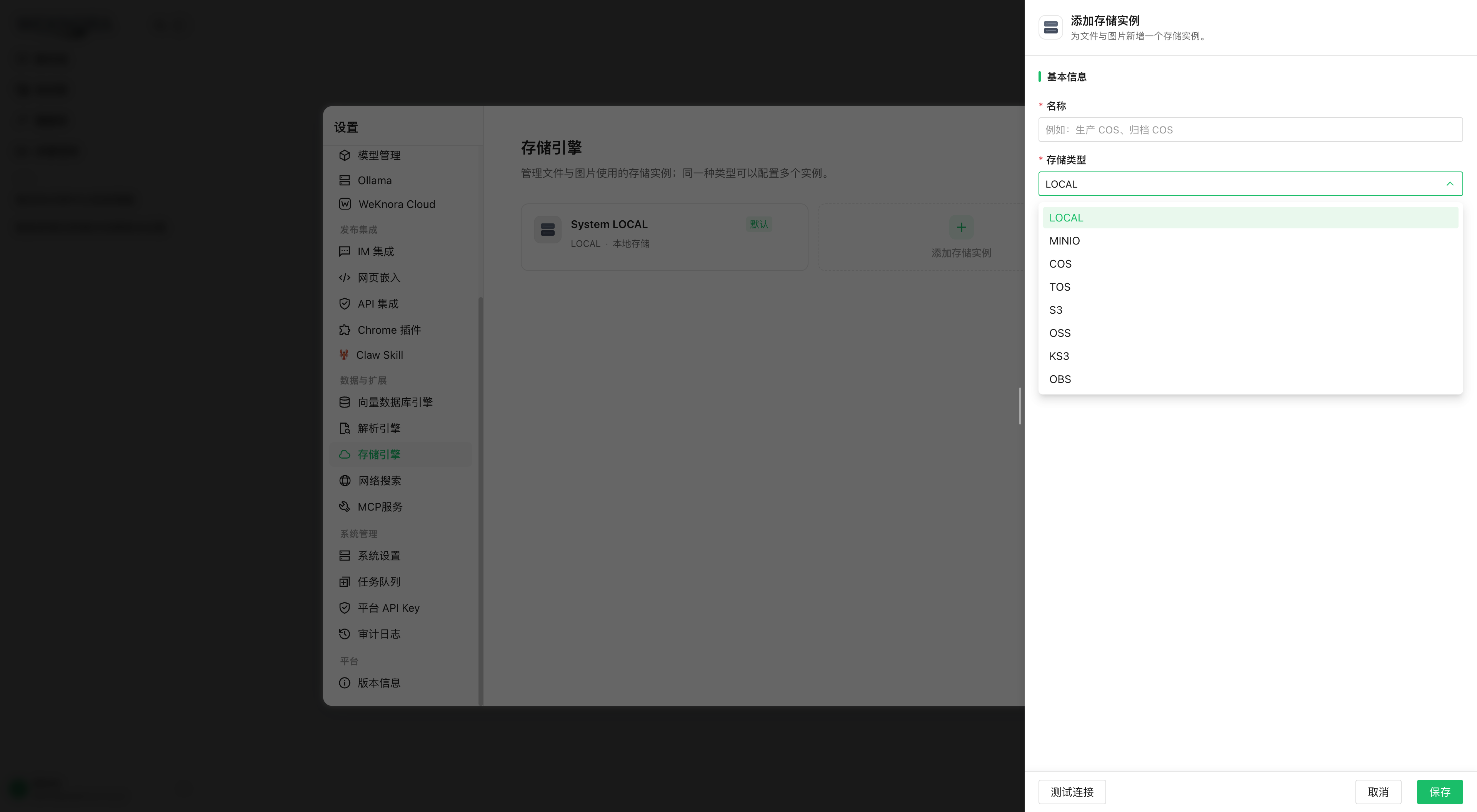
Register and choose a backend
A workspace Admin manages instances under Settings → Storage:
- Create a backend, choose provider (
local/minio/cos/tos/s3/oss/ks3/obs, aligned with providers in the document pipeline), enter connection parameters (table below). The list may be restricted bySTORAGE_ALLOW_LIST; empty = all available; - Test connection: real read/write to validate endpoint, bucket, and credentials;
- Set the workspace default instance. New knowledge bases without an explicit instance use it;
- If needed, Storage tab on knowledge base edit for a dedicated instance.
The backend is changeable only while the knowledge base is empty; with files, the selector is disabled and a message indicates migration. Paths depend on the backend at ingestion—a direct change breaks access. To switch, create a new knowledge base and migrate content.
Connection parameters
Fields common to all providers; access_key_id / secret_access_key encrypted in the database, masked in API responses.
| Name | Type | Default | Description |
|---|---|---|---|
endpoint | string | empty | Service address. Required for minio (mode=remote), tos, s3, oss, ks3, obs; not needed for cos. SSRF check on register; internal addresses via SSRF_WHITELIST |
region | string | empty | Region. Required for cos, tos, s3, oss, ks3, obs |
access_key_id / secret_access_key | string | empty | Access keys; for COS = SecretId / SecretKey. Not needed for local and MinIO mode=docker |
bucket_name | string | empty | Bucket, required except local |
path_prefix | string | empty | Object key prefix: relative path, no leading / or .. |
mode | string | remote | MinIO only: docker = deployment MinIO (MINIO_ENDPOINT, etc.), remote = external MinIO |
use_ssl | bool | false | HTTPS for MinIO, S3, OBS |
force_path_style | bool | false | S3 only: path-style; often required for S3-compatible services |
app_id | string | empty | COS only: Tencent AppID |
temp_bucket_name / temp_region | string | empty | COS, TOS, OSS: bucket/region for temp files; OSS also requires use_temp_bucket=true |
- OBS: domain endpoint → virtual-hosted style (
<bucket>.<endpoint>); Huawei Cloud rejects path-style on domain since 2023-12-30; IP → path-style. Without proxy domain, file URL<scheme>://<bucket>.<endpoint-host>/<key>. - Transfer timeouts: S3, COS, KS3, OBS, OSS upload/download—no global 30 s cap; max 30 min per transfer; connection, TLS, and response headers still limited to fail fast if peer disappears.
- KS3 redirects: each hop is SSRF-reviewed; signature is not forwarded to the redirect host.
Difference from vector storage
Raw files and search indexes are managed separately:
| Storage backend | Vector store | |
|---|---|---|
| Content | Raw files, images, exports | Vectors and search indexes |
| Configuration | Settings → Storage | Settings → Vector store |
| Knowledge base field | storage_backend_id | vector_store_id |
| Chapter | this document | Retrieval engines and vector storage |
API reference
| Method | Path | Permission |
|---|---|---|
| GET | /storage-backends/types | Viewer+, providers allowed by STORAGE_ALLOW_LIST |
| GET | /storage-backends, /storage-backends/:id | Viewer+ |
| POST | /storage-backends | Admin+ |
| PUT / DELETE | /storage-backends/:id | Admin+ |
| POST | /storage-backends/test | Admin+, test with unregistered parameters |
| POST | /storage-backends/:id/test | Admin+, test registered instance |
| PUT | /storage-backends/:id/default | Admin+, workspace default |
API key: manage_storage_backends capability or full-access.
Data model and compatibility rules
Table storage_backends (tenant_id isolation, soft delete):
| Field | Description |
|---|---|
name | Unique in workspace (partial index under soft delete) |
provider | Storage type |
config | JSONB, encrypted keys |
source | user (UI or API) / env (generated from environment variables) |
status | active / disabled |
legacy_alias | see below |
legacy_alias preserves compatibility with history configured via environment variables. On upgrade, an alias record resolves existing paths without moving data. One alias per workspace per provider; manually created instances stay distinct.