
Seafile integration
seafile synchronizes checked directories and files from a Seafile library into the knowledge base, with scheduling, incremental sync, resume, and source deletion reconciliation. Compatible baseline: Seafile Community Server 10.0.1 (api2 API). General flow: Data source synchronization.
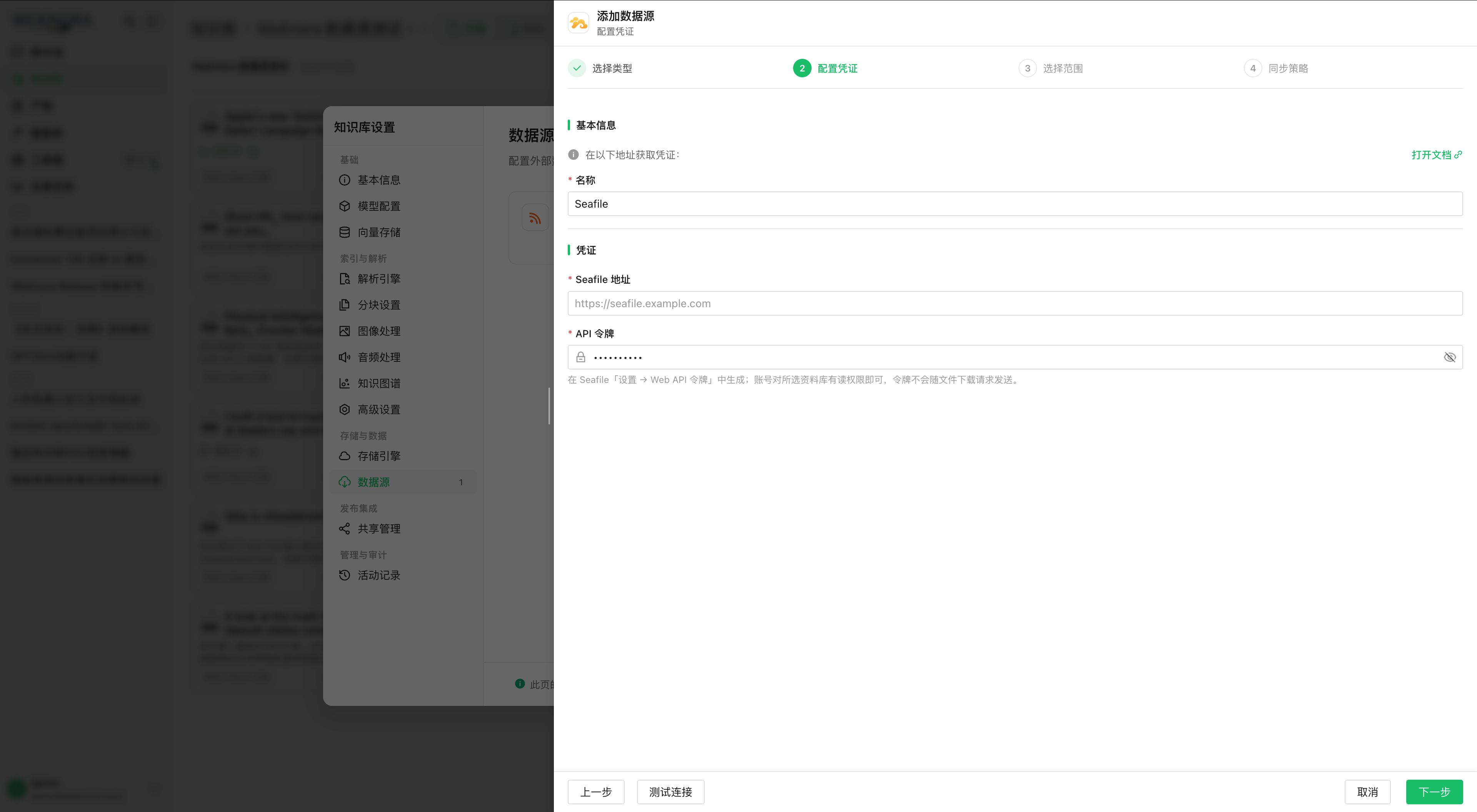
Account and API token
Use an account that can sign in to Seafile with at least read access on the target library; sync scope follows account rights. Credentials are the user API token; the connector does not handle passwords, SSO, or library-specific tokens.
On Seafile 10.0.1, Web API Auth Token in personal settings is hidden by default: the admin must set ENABLE_GET_AUTH_TOKEN_BY_SESSION = True in seahub_settings.py and restart Seahub. Otherwise POST /api2/auth-token/ with credentials; with 2FA, supply the code per X-Seafile-OTP in the response.
GsKnora’s test calls /api2/auth/ping/; library and folder visibility is handled when loading the tree.
Configuration in the knowledge base
- Knowledge base settings → Data sources → New, Seafile.
- Seafile address and API token, test connection. The address may include a deployment prefix, e.g.
https://example.com/seafile. - Check library root, folder, or file. The first level lists accessible unencrypted libraries; progressive expansion; one source = one library, a second is rejected.
- Full/incremental, schedule, conflicts, sync deletion; save then test manual sync, logs, and parsing.
Checking a folder = recursive sync (new files/subfolders included); a file = that file only; child covered by parent = keep the parent. The selector shows only GsKnora-importable extensions; .zip etc. are absent and not synced.
Network and SSRF
| Request | Target | Token |
|---|---|---|
API (/api2/…) | Configured Seafile address | Yes, Authorization: Token |
| File download | Fileserver link returned by Seafile, often /seafhttp/… on same domain, sometimes separate domain | No |
Both pass SSRF validation. Seafile on private network or fileserver on dedicated domain: add the host to SSRF_WHITELIST in .env, otherwise “base_url SSRF validation failed” on save, or seafile_ssrf_blocked in logs.
Tree, formats, and size
Files land under <library name>/<path in library> with source tag “Seafile”. Library name is fixed at first sync in the cursor; renaming in Seafile does not change the KB folder or re-download. Illegal characters cleaned segment by segment.
Formats align with KB upload (PDF, Office, Markdown, HTML, images, common audio), see internal/utils/import_filetypes.go. Images: VLM configured on KB; audio: ASR; otherwise ingestion failure in sync logs, other files unchanged.
File cap = MAX_FILE_SIZE_MB (default 50 MiB): too large = seafile_file_too_large without download; overrun during download = reject without truncation. Raising the value also requires DOCREADER_GRPC_MAX_FILE_SIZE_MB and restart app, docreader, frontend, otherwise download OK but gRPC reject at parsing.
Sync behavior
Fingerprint per file “object ID + mtime + size” in cursor; identical = no re-download; change = re-download and replace (delete then create, doc briefly unavailable during parsing). Turn with no changes = directory scan only.
| Source action | Behavior |
|---|---|
| New file or subfolder | Picked up on next sync |
| Content changed | Re-download and update |
| File deleted | KB entry deleted if “sync deletion” on, else cursor entry removed only |
| Rename, move, or out of scope | New path imported as new; old path treated as deletion; no KB entry ID preservation |
| Checked folder/file deleted or renamed | Error, turn stops, no deletions; re-select scope |
| Library renamed | Unchanged, folder name = first sync |
Failure handling:
| Case | Behavior |
|---|---|
| File 403/404/5xx, network, size, empty, change during download | Entry failed, other files continue; path stays on cursor, retry next sync |
| Directory list 403/404/5xx or malformed response | Save progress then stop, no deletions this turn |
| 429/502/503/504 or transient network | Up to 3 attempts, backoff 1s, 2s; Retry-After ≤ 60s honored, else stop turn |
| Invalid token (401/403) | Credential error, source in error state |
Checkpoint every 50 cursor changes, before deletions and at end; after timeout/interruption, resume from last checkpoint without re-downloading saved items. First massive sync may span several tasks. Forced full sync re-downloads all while keeping old cursor for deletion reconciliation.
“Retry connector” (re-download failure) ≠ “resume ingestion/parsing” (file submitted but parse/index failed, retry on KB side, ingestion failure in sync logs).
Sync log error codes:
| Code | Meaning |
|---|---|
seafile_permission_denied | Token account lacks rights on file/folder |
seafile_not_found | File gone after scan; retry next sync, then reconcile if “sync deletion” |
seafile_file_too_large | Exceeds MAX_FILE_SIZE_MB |
seafile_empty_file | Empty file, skipped |
seafile_source_changed | File changed during download, retry next sync |
seafile_invalid_response | Unreadable Seafile response, often version or reverse proxy |
seafile_ssrf_blocked | Download URL blocked by SSRF |
seafile_fetch_failed | Other fetch failure, retry next sync |
Precautions
- Source already synced: do not rebind another library—the next sync fails with “this data source already synced Seafile library …” and cursor unchanged; create a new source. Deselect before save to change library.
- Incomplete deletion reconciliation: turn with scan failure deletes nothing; deletions while “sync deletion” off are not caught up when re-enabled.
- Deleting/recreating the source does not clean imported KB entries.
- Encrypted libraries absent from selector; SeaDoc, custom attributes, and bidirectional sync out of scope.
Common issues
| Symptom | Action |
|---|---|
| SSRF on saving credentials | Private address or blocked port → SSRF_WHITELIST |
| “Seafile library … not found” | Account cannot see library or library deleted |
| “encrypted Seafile libraries are not supported” | Encrypted library selected |
Many seafile_ssrf_blocked | Fileserver domain ≠ API, not whitelisted |
seafile_file_too_large | Raise MAX_FILE_SIZE_MB and DOCREADER_GRPC_MAX_FILE_SIZE_MB, restart |
| File downloaded, entry parse failed | Ingestion issue; VLM/ASR and DocReader logs |
| “this data source already synced Seafile library …” | Rebind library; restore or new source |
Implementation reference: internal/datasource/connector/seafile/ and internal/application/service/datasource_service.go.