
Platform administration and system administrators
System administrators manage global GsKnora deployment settings, task queues, platform API keys, and cross-workspace audit. A workspace Owner administers one workspace; the two statuses are independent. Roles within a workspace: Tenants, users, and authentication.
Respective scopes:
| Workspace Owner | System administrator | |
|---|---|---|
| Scope | One workspace | Entire deployment |
| Grant | At workspace creation or transfer by Owner | By an existing system admin; the first via bootstrap environment variable |
| Managed content | Members, models, knowledge bases, integrations, workspace audit | System settings, queues, platform API keys, cross-workspace audit, password resets |
| Automatic overlap | — | No: workspace Owner ≠ system admin, and vice versa |
Access to other workspaces’ data goes through CanAccessAllTenants. System administrator status does not automatically open knowledge base content elsewhere.
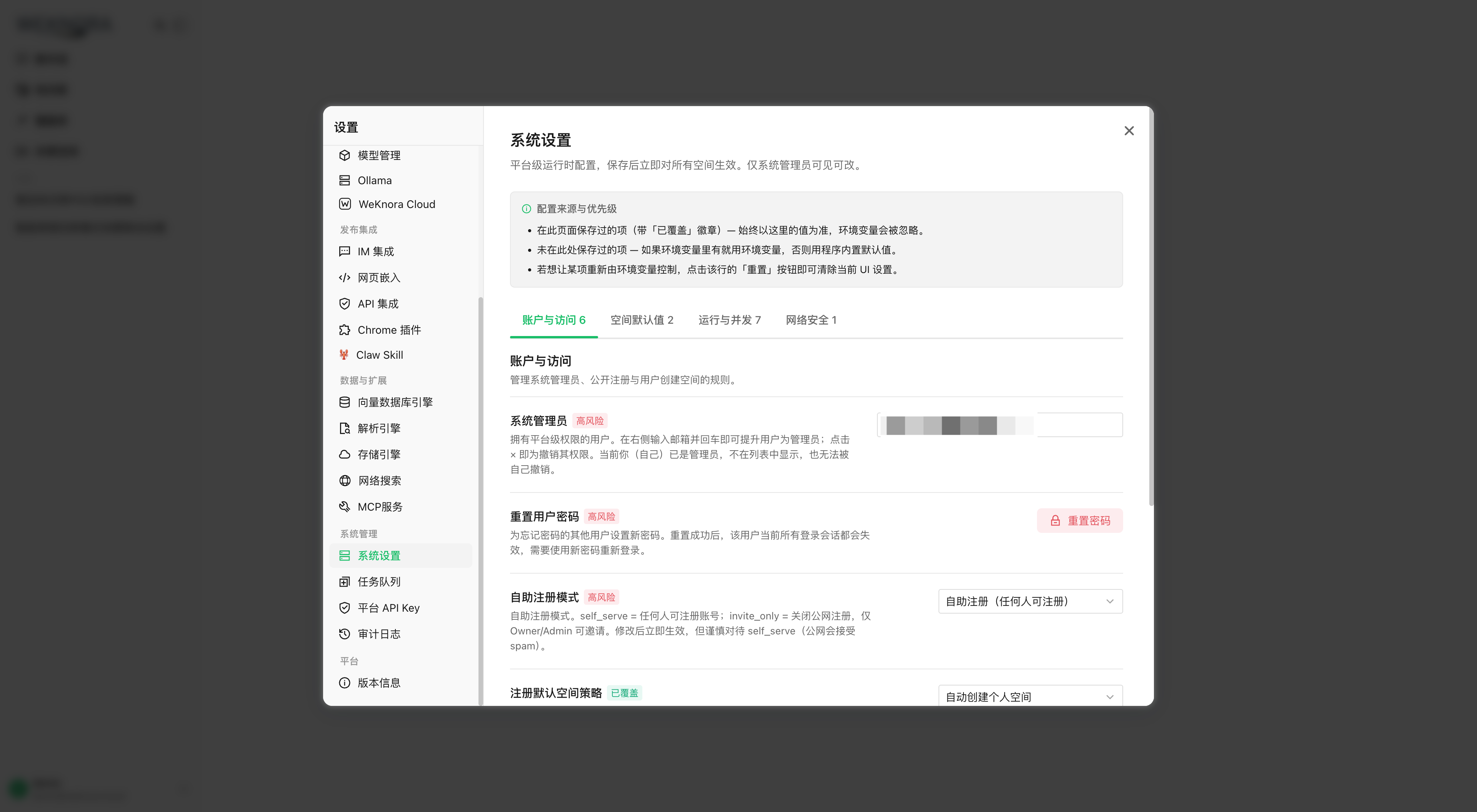
Configure the first system administrator
On a new deployment:
- Register an account through the usual flow;
- Set
WEKNORA_BOOTSTRAP_SYSTEM_ADMIN_EMAIL=<account email>for the app service, restart; - At startup, if no system admin exists yet, the matching user is promoted.
Bootstrap does not create an account: unknown email → log alert, retry on restart; config error without blocking the service. Once a system admin exists, the variable no longer grants rights.
Then promote/revoke in the UI. Cannot revoke yourself or the last active system admin. API: POST /system/admin/promote and /revoke; revoking a non-admin → 200, audit changed=false.
Use the platform console
Under Settings, sidebar reserved for system admins:
| Section | Role | API |
|---|---|---|
| System settings | Global runtime switches (registration, workspace policy, concurrency, SSRF whitelist, etc.), per-key effect rules—table below | GET/PUT/DELETE /system/admin/settings[/:key] |
| Model catalog | Catalog models, source, edit/add/batch JSON (immediate effect), restore by version; see Catalog management | /system/admin/model-catalog* |
| Task queues | Live asynq backlog, retry/archive/delete per task, purge archived; Lite mode → available=false | /system/admin/runtime/queues* |
| Platform API keys | Platform-scoped keys for control-plane automation: system_tenants_read/manage, system_settings_read/manage, system_runtime_read/manage, system_audit_read | /system/admin/api-keys |
| System audit log | Platform events tenant_id = 0 (settings, promote/revoke, queues, etc.). Workspace audit APIs filter by tenant and do not show these rows | GET /system/admin/audit-log |
Other reserved actions:
- Reset user password (
POST /system/admin/users/reset-password): replaces target local password and revokes all sessions. Not on yourself—personal change requires old password; - Apply default storage quota (
POST /system/admin/tenants/apply-default-storage-quota): writes current default quota to all existing workspaces.
Platform user management
Settings → System settings → User management: deployment-wide list, create, enable/disable, password reset, grant/revoke system admin. Disabling an account revokes sessions immediately; cannot disable yourself or the last active system admin. The list does not expose passwords or hashes.
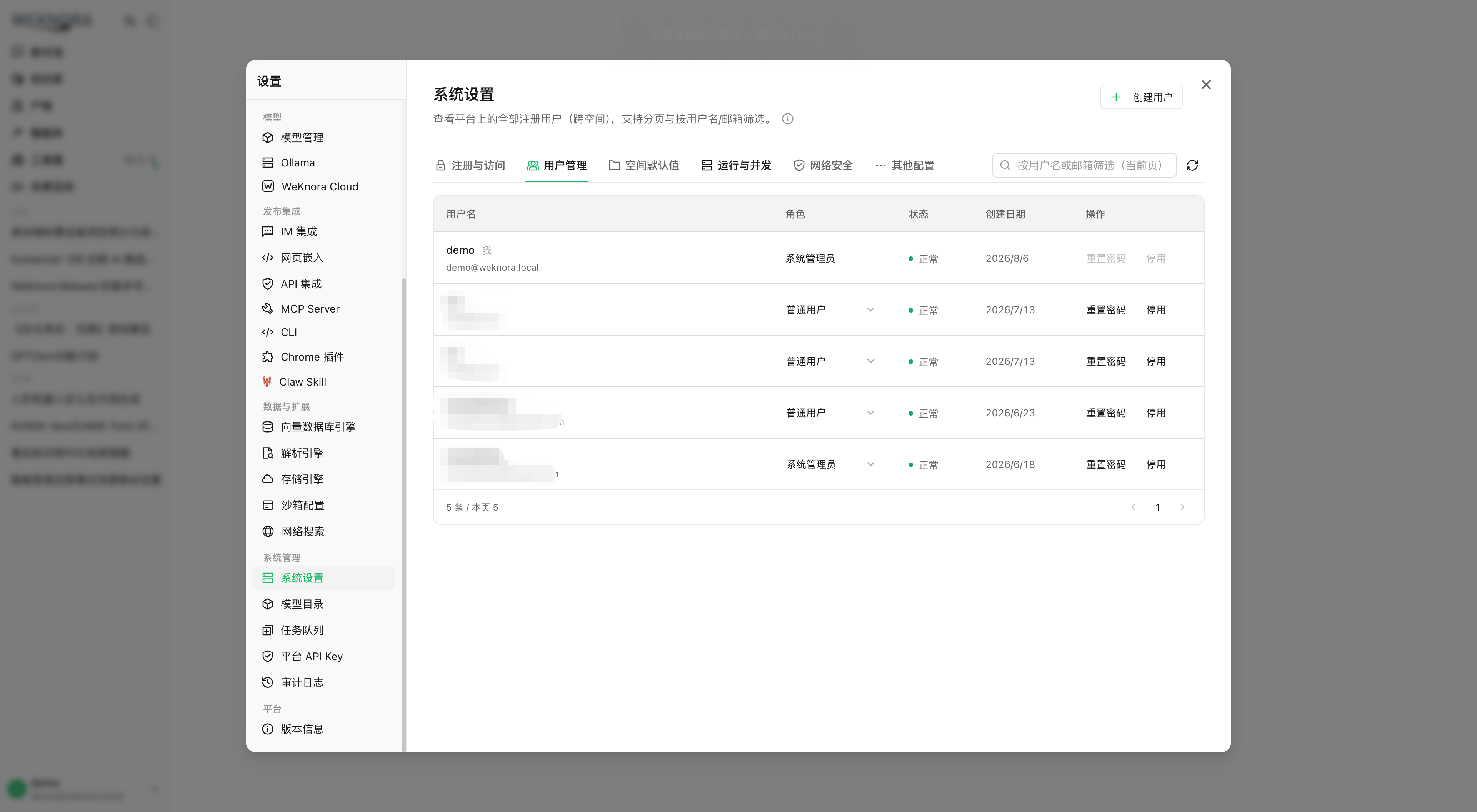
Three registration modes: open, invite-only registration, closed; invite_only = no password registration—existing accounts via invitation. OIDC and admin-created accounts ignore password registration restriction.
Create a user
From v0.8.2, Settings → System settings → User management → Create user: name (2–50 chars), email, random password (default) or policy-compliant entry. Useful when public registration is closed. Workspace assignment per auth.default_tenant_mode: create_personal creates a personal workspace, tenantless waits for invitation.
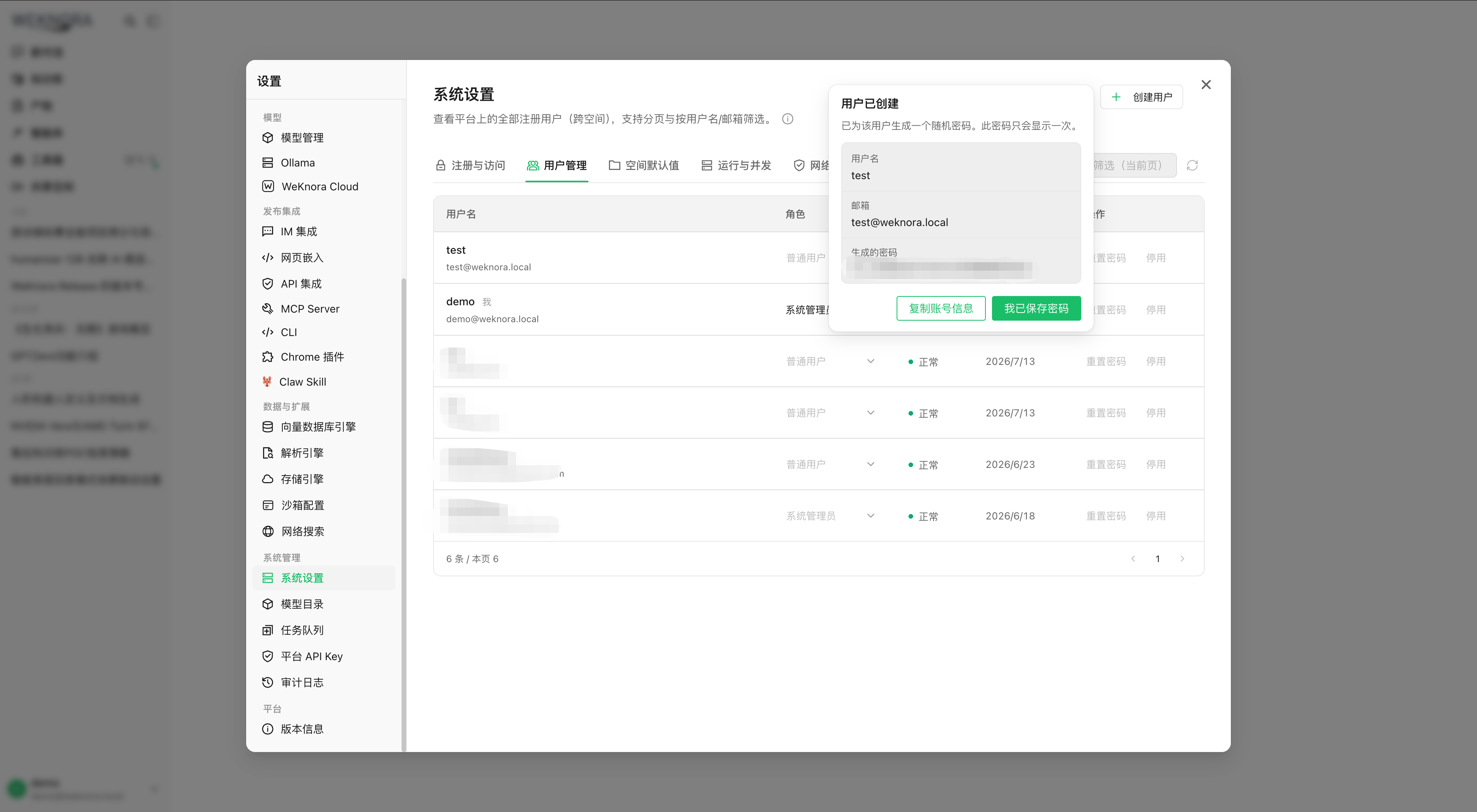
Generated password appears only at creation—copy before closing; cannot close dialog before confirm, no plaintext read afterward. Each creation → audit system.user_created. Duplicate identity → existing user, password unchanged; email and name pointing to different accounts → rejected. API: System API.
Creating a user ≠ bootstrap first admin: bootstrap promotes an existing account.
Runtime settings reference
Settings editable in the console. Database value overrides environment; immediate effect for most; see table for exceptions (new resources, worker rebuild).
| Key | Type | Default | Effect |
|---|---|---|---|
auth.registration_mode | self_serve / invite_register / invite_only | self_serve | Immediate |
auth.default_tenant_mode | create_personal / tenantless | create_personal | New registrants only |
tenant.self_service_creation_enabled | bool | true | Immediate |
tenant.max_owned_per_user | int | 10 (0 = built-in default, negative = unlimited) | On each workspace creation |
tenant.default_storage_quota_gb | int | 10 | Default quota (GB) if MB not active |
tenant.default_storage_quota_mb | int | 0 | MB > 0 overrides GB; 0 or negative → GB. Includes auto personal workspace at registration |
tenant.auto_create_api_key | bool | false | On each workspace creation |
ssrf.whitelist | string list | empty | Immediate (SSRF_WHITELIST_EXTRA stays deployment-side) |
asynq.core/postprocess/enrichment/maintenance/shared/wiki_concurrency | int | see Async tasks | Worker pool reconfiguration |
model.max_concurrency | int | 32 | Immediate |
Other keys (DB priority > env):
| Key | Default | Role |
|---|---|---|
auth.complex_password_enabled | false | New passwords: upper/lower, digit, special |
tenant.auto_accept_invitation | false | Email invitation → direct join if account exists |
sandbox.docker_enabled | false | Allows Docker sandbox config and instances |
tenant.auto_create_api_key is off by default; enable for integrations that expected a full-access key at workspace creation.
Reset a runtime setting
After saving in the console, changing the environment variable does not replace the database value. If config “does not apply”, check runtime settings; DELETE /system/admin/settings/:key removes the override and restores env or built-in default.
Related documentation
- Four-level roles and workspace API keys: Tenants, users, and authentication
- Queue topology and pools: Async tasks
- Audit and traces: Observability and audit
- Endpoint list: System and platform administration API
Implementation reference
cmd/server/bootstrap.go: first system administrator.frontend/src/config/settingsAccess.ts: platform settings sections.internal/application/service/system_setting.go: runtime settings registry.
Default workspace storage quota
Manual creation, classic registration, or OIDC with auto personal workspace: same default quota at creation. E.g. WEKNORA_TENANT_DEFAULT_STORAGE_QUOTA_MB=50 → 50 × 1024² bytes. Positive MB overrides GB; MB 0 or negative → GB; non-positive GB → 10 GB. Order per key: DB override > environment variable > built-in default; saving MB=0 cancels env and re-enables GB. MB out of int64 range → fall back to GB; GB overflow → 10 GB, not unlimited quota.
Default affects only workspaces created afterward. Explicit storage_quota (bytes) stays priority; existing workspaces are not updated alone. To update them: Apply to all existing workspaces action, confirm with effective MB/GB. Overwrites all quotas, including individual adjustments.
No need to change the column SQL DEFAULT: the service writes explicit bytes, avoiding GORM overwriting an upgrade ALTER TABLE ... SET DEFAULT; old DEFAULT remains for SQL inserts outside the service.